SingleStockOM5 An Example MSE
This chapter provides a walkthrough of the MSE process, from specifying an operating model through to evaluating management procedure performance. The aim is for users to see the process end-to-end and become familiar with how the primary objects and functions interact.
5.1 Specify an Operating Model
The first step in any MSE is to construct the operating model. The OM represents the best available understanding (or one hypothesis of several alternative understandings) of the stock and fishery dynamics, and all management procedure evaluations are conditioned on it.
This chapter uses SingleStockOM, one of openMSE’s built-in example operating models. It is a single-stock, single-fleet OM with 8 stochastic simulations, 20 historical years, and 30 projection years.
The small number of simulations keeps the model fast to run for demonstration purposes. In practice the number of simulations should be sufficiently high that the quantitative performance metrics are stable.
See Chapter 4 for an overview of all example objects and Developing Operating Models for details on the different methods for constructing operating models.
Typing the OM object name in the console prints a summary of its contents (Figure 5.1):
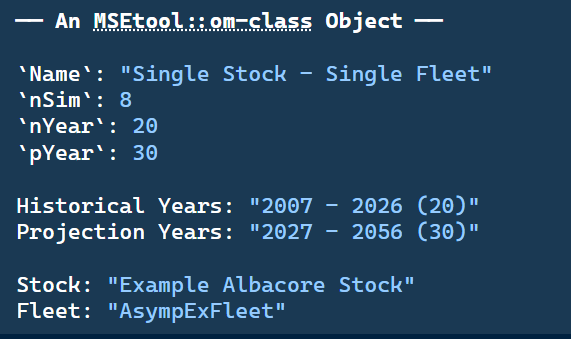
SingleStockOM object printed to the R console.
More information on SingleStockOM can be found by accessing the help documentation:
?SingleStockOMand more information on OM objects can be found in Chapter 2 as well as the help documentation:
?OM5.2 Simulate Historical Fishery
Once an OM has been constructed, the historical fishery can be simulated (or reconstructed) using the Simulate function:
myHist <- Simulate(SingleStockOM)As with the OM object above, typing the object name in the console prints a summary of its contents (Figure 5.2):
myHist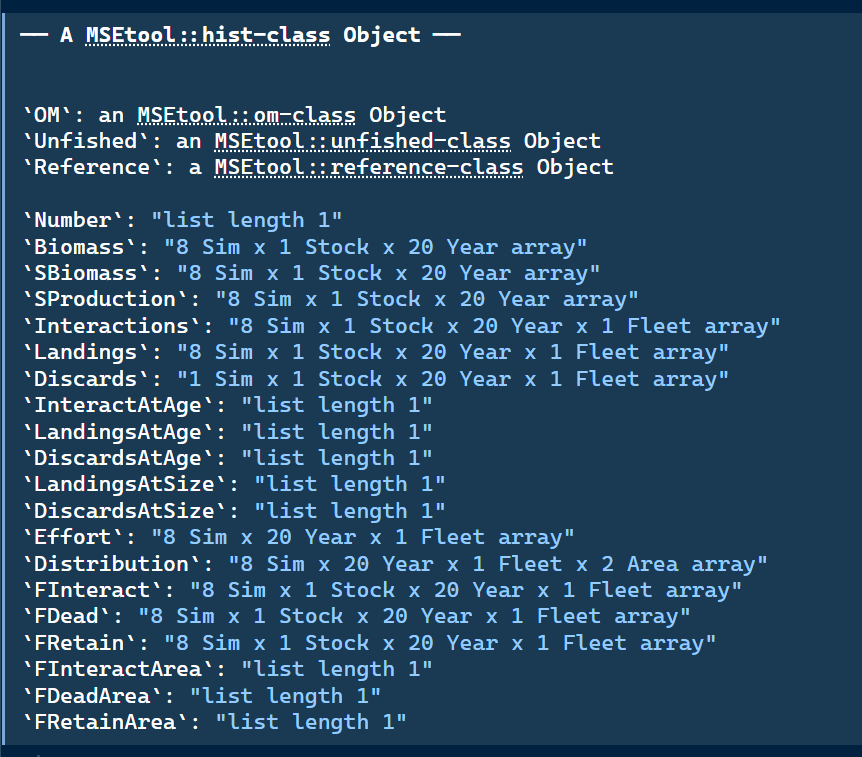
Hist object printed to the R console.
The Hist object contains the complete historical simulation output. Its key components are:
-
The OM: the
OMobject used to generate the simulation. -
Reference quantities: unfished equilibrium and dynamic trajectories (
Unfished) and biological reference points (Reference). See Chapter 22 for more details. -
Population dynamics: total biomass (
Biomass), spawning biomass (SBiomass), and spawning production (SProduction), eachSim × Stock × Year. Numbers-at-age (Number) is a list ofSim × Age × Year × Areaarrays, one per stock. -
Fishery dynamics: fishing effort and its spatial distribution (
Effort,Distribution); total biomass interacting with the gear (Interactions); landings and discards, both totals and at-age/at-size (Landings,Discards,LandingsAtAge,DiscardsAtAge,LandingsAtSize,DiscardsAtSize); and fishing mortality decomposed into interacting, dead, and retained components (FInteract,FDead,FRetain), with area- and age-specific counterparts (FInteractArea,FDeadArea,FRetainArea). -
Observed data: the historical fishery data for each stock complex (
Data; not shown in figure above). Either the real data provided inOM@Dataand/or simulated data generated by the observation model during the historical period. See Chapter 7 for more details.
TipNested-List Outputs
Stocks can have different numbers of age classes, so any Hist output with an age dimension (e.g. Number, LandingsAtAge) is stored as a list by stock, rather than a single array, with Fleet retained as an array dimension where relevant.
At-size outputs (LandingsAtSize, DiscardsAtSize) are nested one level further, by stock then fleet, since fleets are not required to share a common size-class grid.
See ?Hist for full documentation of the hist-class and its slots.
5.2.1 Exploring the Hist Object
The historical fishery dynamics contained in Hist can be explored using a set of extractor functions that return tidy data frames:
-
Number(),Biomass(),SBiomass(),SProduction(): population abundance, total biomass, spawning biomass, and spawning production (egg production ifFecundityis specified, otherwise equal to spawning biomass). -
Interactions(),Landings(),Discards(),Removals(): total biomass interacting with the gear, retained catch, dead discards, and removals (landings plus dead discards). -
FInteract(),FDead(),FRetain(): apical fishing mortality for fish that interact with the gear, are killed by it, and are retained, respectively. -
Effort(): fishing effort by fleet.
Each returns a data frame with columns Sim, Stock, Year, Period, and Value, summed by default over age, size, area, and fleet. Optional byAge/byArea/byFleet arguments (and bySize for the catch-based functions) retain those dimensions instead.
See ?Biomass, ?Landings, ?Number, and ?FDead for full documentation.
Biomass(myHist) |> head()# A tibble: 6 × 7
Sim Stock Year Period Value Variable Units
<dbl> <ord> <dbl> <chr> <dbl> <chr> <chr>
1 1 Example Albacore Stock 2007 Historical 15221. Biomass t
2 1 Example Albacore Stock 2008 Historical 15962. Biomass t
3 1 Example Albacore Stock 2009 Historical 16460. Biomass t
4 1 Example Albacore Stock 2010 Historical 16597. Biomass t
5 1 Example Albacore Stock 2011 Historical 16407. Biomass t
6 1 Example Albacore Stock 2012 Historical 16132. Biomass t Biomass(myHist, byAge = TRUE, byArea = TRUE) |> head()# A tibble: 6 × 9
Sim Stock Year Period Age Area Value Variable Units
<dbl> <ord> <dbl> <chr> <dbl> <dbl> <dbl> <chr> <chr>
1 1 Example Albacore Stock 2007 Historic… 0 1 71.9 Biomass t
2 1 Example Albacore Stock 2007 Historic… 0 2 683. Biomass t
3 1 Example Albacore Stock 2007 Historic… 1 1 111. Biomass t
4 1 Example Albacore Stock 2007 Historic… 1 2 1053. Biomass t
5 1 Example Albacore Stock 2007 Historic… 2 1 175. Biomass t
6 1 Example Albacore Stock 2007 Historic… 2 2 1666. Biomass t SBiomass(myHist) |> head()# A tibble: 6 × 7
Sim Stock Year Period Value Variable Units
<dbl> <ord> <dbl> <chr> <dbl> <chr> <chr>
1 1 Example Albacore Stock 2007 Historical 6621. SBiomass t
2 1 Example Albacore Stock 2008 Historical 6765. SBiomass t
3 1 Example Albacore Stock 2009 Historical 6810. SBiomass t
4 1 Example Albacore Stock 2010 Historical 6720. SBiomass t
5 1 Example Albacore Stock 2011 Historical 6593. SBiomass t
6 1 Example Albacore Stock 2012 Historical 6455. SBiomass t
TipThe
Units Column
The Units column reported by Biomass(), SBiomass(), and SProduction() is computed by combining the stock’s base unit (Weight@Units or Fecundity@Units) with the SRR@Units scaling factor applied to R0 (see Chapter 2). AlbacoreExStock has Weight@Units = "kg" and SRR@Units = 1000 (R0 in thousands of fish), which resolves to "t", since the two scaling factors compound.
Landings and discards are extracted similarly:
Landings(myHist) |> head()# A tibble: 6 × 8
Sim Stock Year Period Fleet Value Variable Units
<dbl> <ord> <dbl> <chr> <ord> <dbl> <chr> <chr>
1 1 Example Albacore Stock 2007 Historical AsympExFle… 0 Landings t
2 1 Example Albacore Stock 2008 Historical AsympExFle… 304. Landings t
3 1 Example Albacore Stock 2009 Historical AsympExFle… 647. Landings t
4 1 Example Albacore Stock 2010 Historical AsympExFle… 929. Landings t
5 1 Example Albacore Stock 2011 Historical AsympExFle… 1102. Landings t
6 1 Example Albacore Stock 2012 Historical AsympExFle… 1280. Landings t Discards(myHist) |> head()# A tibble: 6 × 8
Sim Stock Year Period Fleet Value Variable Units
<dbl> <ord> <dbl> <chr> <ord> <dbl> <chr> <chr>
1 1 Example Albacore Stock 2007 Historical AsympExFle… 0 Discards t
2 1 Example Albacore Stock 2008 Historical AsympExFle… 0 Discards t
3 1 Example Albacore Stock 2009 Historical AsympExFle… 0 Discards t
4 1 Example Albacore Stock 2010 Historical AsympExFle… 0 Discards t
5 1 Example Albacore Stock 2011 Historical AsympExFle… 0 Discards t
6 1 Example Albacore Stock 2012 Historical AsympExFle… 0 Discards t
TipArray Dimensions
By default, arrays stored in Hist are automatically compressed along the Sim dimension when the simulations all share identical values. For example, if all simulations produce zero discards, the discard array is stored with a single row rather than nSim identical rows.
Some operations, such as plotting one line per simulation, require the full nSim dimension. Use Extend() to expand an array back to full size:
L_Array <- Landings(myHist, df = FALSE)
D_Array <- Discards(myHist, df = FALSE)

dim(L_Array)
Sim Stock Year Fleet
8 1 20 1 dim(D_Array) # all discards are 0 for every simulation Sim Stock Year Fleet
1 1 20 1 Discards(myHist) <- Extend(Discards(myHist, df = FALSE), nSim = nSim(myHist))
dim(Discards(myHist, df = FALSE)) Sim Stock Year Fleet
8 1 20 1 See ?Extend and ?ReduceDims for full documentation.
5.3 Specify Management Procedures
Once the historical fishery dynamics have been simulated, the operating model can be projected forward under different management policies, known as management procedures (MPs).
The design and selection of MPs is a central component of any MSE, and can range from simple empirical rules based on catch history to complex model-based procedures involving stock assessment.
This example MSE uses a set of simple example MPs included with openMSE (see Chapter 11), returned by the convenience function ExampleMPs():
-
CurrentEffort: maintains fishing effort at its terminal historical level for all fleets. -
CurrentCatch: sets the TAC for each fleet to the total removals observed in the last historical year. -
AverageCatch: sets the TAC to the mean total removals over the historical years.
A full description of MP development and specification is given in Chapter 10.
5.4 Run Forward Projections
Once the historical dynamics have been simulated and the MPs specified, the closed-loop projections are run using Project():
myMSE <- Project(Hist = myHist, MPs = ExampleMPs())Project() runs each MP in turn over the projection period. At each management interval, the operating model passes the current Data object to the MP, applies the returned Advice to the simulated population, and advances the model forward. This loop is repeated until the end of the projection period.
As with the OM and Hist objects, typing the object name in the console prints a summary of its contents (Figure 5.3):
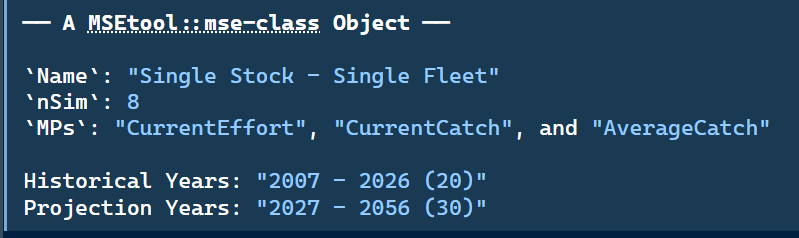
MSE object printed to the R console.
The MSE object contains the complete projection output. It extends the Hist object with projection-period equivalents of all the population and fishery dynamics arrays, indexed by MP in addition to simulation, stock, fleet, year, and area.
The same extractor functions used to explore Hist (Biomass(), Landings(), FDead(), etc.) work on MSE objects, with the historical and projection periods labelled via a Period column, and an additional MP column.
See ?MSE for full documentation of the mse-class and its slots.
5.4.1 Exploring the MSE Object
The projection results can be explored using the same extractor functions as for Hist:
SBiomass(myMSE) |> head()# A tibble: 6 × 8
Sim Stock Year Period Value Variable Units MP
<dbl> <ord> <dbl> <chr> <dbl> <chr> <chr> <chr>
1 1 Example Albacore Stock 2007 Historical 6621. SBiomass t Historical
2 1 Example Albacore Stock 2008 Historical 6765. SBiomass t Historical
3 1 Example Albacore Stock 2009 Historical 6810. SBiomass t Historical
4 1 Example Albacore Stock 2010 Historical 6720. SBiomass t Historical
5 1 Example Albacore Stock 2011 Historical 6593. SBiomass t Historical
6 1 Example Albacore Stock 2012 Historical 6455. SBiomass t HistoricalLandings(myMSE) |> tail()# A tibble: 6 × 9
Sim Stock Year Period Fleet Value Variable Units MP
<dbl> <ord> <dbl> <chr> <ord> <dbl> <chr> <chr> <chr>
1 8 Example Albacore Stock 2055 Projection Asym… 671. Landings t Curr…
2 8 Example Albacore Stock 2055 Projection Asym… 692. Landings t Curr…
3 8 Example Albacore Stock 2055 Projection Asym… 644. Landings t Aver…
4 8 Example Albacore Stock 2056 Projection Asym… 648. Landings t Curr…
5 8 Example Albacore Stock 2056 Projection Asym… 692. Landings t Curr…
6 8 Example Albacore Stock 2056 Projection Asym… 644. Landings t Aver…5.5 Evaluating Performance
MSE results are typically evaluated using quantitative performance metrics (PMs), numerical summaries of management procedure performance against objectives specified by fishery managers. Common examples include the probability of maintaining spawning biomass above a limit reference point, the average catch over the projection period, and the inter-annual variability in catch.
openMSE includes extractor functions for common derived quantities used in performance metric calculations. For example, SB_SB0() returns spawning biomass relative to unfished spawning biomass (\(SB/SB_0\)) for each simulation, MP, stock, and year (these extractor functions also work for Hist objects):
A simple summary table across MPs:
# A tibble: 3 × 4
  MP            Median         Lower Upper
  <chr>          <dbl>         <dbl> <dbl>
1 AverageCatch   0.286 0.00000000732 0.754
2 CurrentCatch   0.400 0.0000000251  0.814
3 CurrentEffort  0.284 0.0252        0.507
5.5.1 Plotting MSE Output
Projection results can also be visualised directly. openMSE provides a family of Plot*() functions (PlotBiomass(), PlotSBiomass(), PlotF(), etc.) that work on both Hist and MSE objects, so custom plotting code is rarely needed. Figure 5.4 uses PlotSBiomass(myMSE, relative = "B0") to show \(SB/SB_0\) trajectories across simulations and MPs. See ?plot_hist for the full family of plotting functions, including options to facet by stock/fleet, overlay individual simulation replicates, and plot relative to BMSY instead of B0.
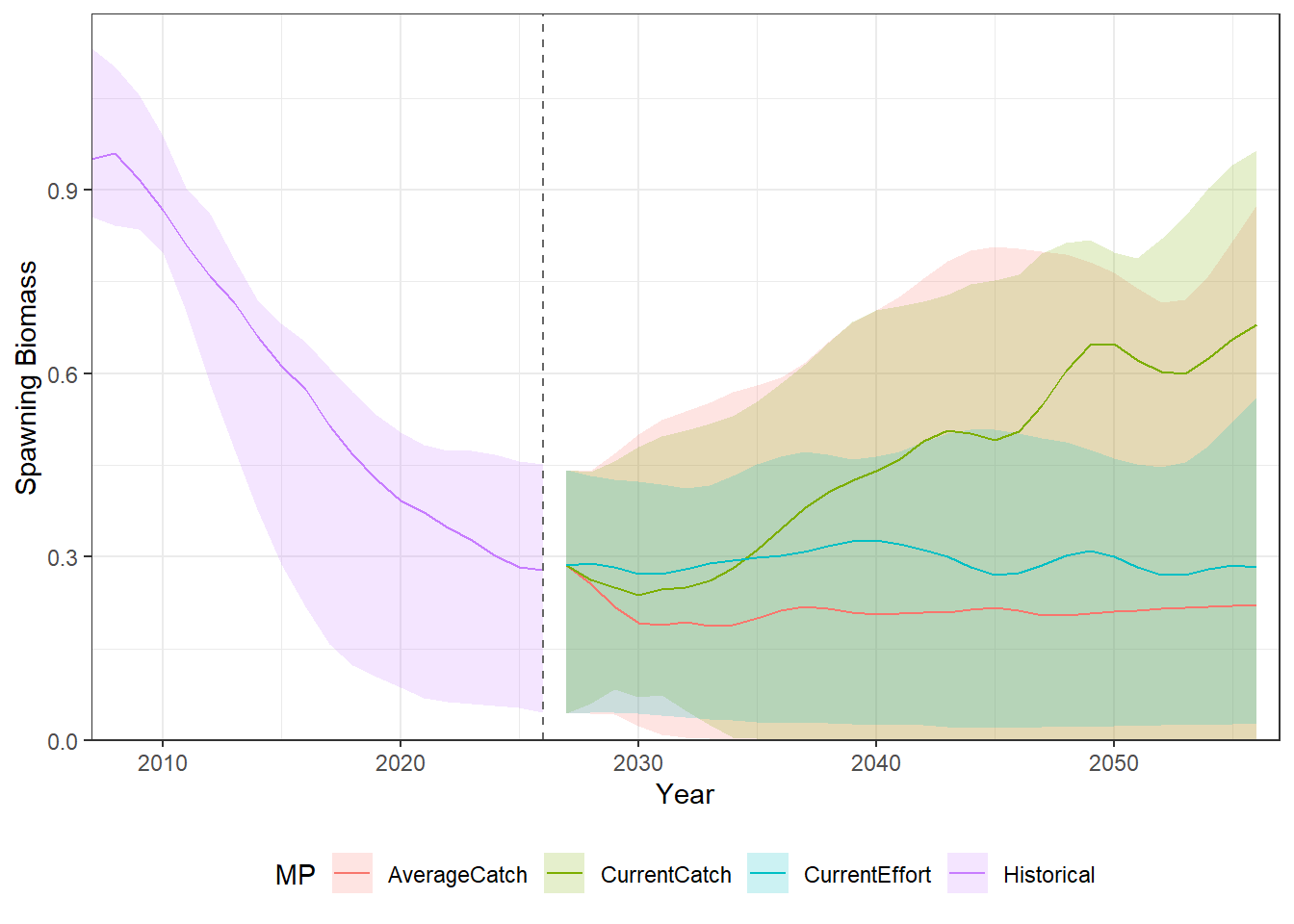
SingleStockOM, produced by PlotSBiomass(). The shaded region spans the 10th–90th percentile; the solid line shows the median. Historical years are shown in grey; each MP’s projection is coloured and continues from the last historical value.
5.5.2 Performance Metric Functions
openMSE also includes a set of built-in performance metric functions (PM_*), which summarise MSE results against a specific management objective and return a pm object rather than a raw data frame. Each pm object reports the underlying statistic by simulation, stock, and MP (@Stat), and, for metrics with a pass/fail objective, the proportion of years that objective is met, averaged across simulations (@Prob and @Mean).
PM_SBSBMSY() and PM_FFMSY() give the probability of maintaining spawning biomass above SBMSY and fishing mortality below FMSY, respectively, over the projection period:
# A tibble: 6 × 4
  PM            Stock                  MP            Value
  <chr>         <ord>                  <chr>         <dbl>
1 P(SB > SBMSY) Example Albacore Stock AverageCatch  0.504
2 P(SB > SBMSY) Example Albacore Stock CurrentCatch  0.667
3 P(SB > SBMSY) Example Albacore Stock CurrentEffort 0.625
4 P(F < FMSY)   Example Albacore Stock AverageCatch  0.5
5 P(F < FMSY)   Example Albacore Stock CurrentCatch  0.746
6 P(F < FMSY)   Example Albacore Stock CurrentEffort 0.625
PM_Yield() reports mean projected yield instead. Yield has no pass/fail objective by default, so @Prob and @Mean are left NA; the projected yield itself is only in @Stat, which retains the Sim dimension and must be summarised across simulations directly:
# A tibble: 3 × 3
  Stock                  MP            Mean_Yield
  <ord>                  <chr>              <dbl>
1 Example Albacore Stock AverageCatch        470.
2 Example Albacore Stock CurrentCatch        527.
3 Example Albacore Stock CurrentEffort       901.
See ?PM for the full list of available performance metrics, and ?pm-class for the structure of the returned object.
For interactive visualization and exploration of MSE results, we recommend Slick, a web-based application developed for summarizing and communicating MSE output to scientists, managers, and other stakeholders. Slick aprovides an interactive interface for plotting performance metrics, comparing MPs across objectives, and producing presentation-ready figures. It is particularly useful for stakeholder engagement and for the performance trade-off analysis that is central to the MP selection process.