17 Length Object
The Length object is optional if no other objects are a function of length (e.g., Weight, Maturity, Fecundity and Selectivity etc in the Fleet object, and there is no requirement to generate catch-at-length data.
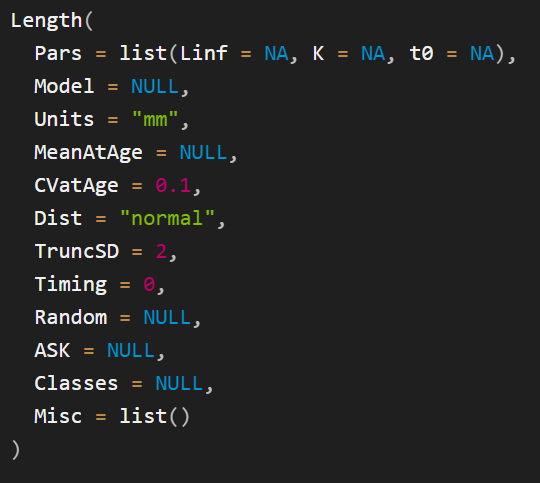
The Length() function is used to create Length objects. The help documentation for this function (?Length) provides details on the contents of the Length object and a description of the arguments for the Length() function (Figure 17.1).
Length function
Ultimately, users must provide information to populate MeanAtAge and CVatAge in a Length object. MeanAtAge is common to all objects that contain at-age information, and, as the name suggests, contains information describing the mean at-age schedule (in this case the mean length-at-age). CVatAge contains the coefficient of variability for the distribution of length-at-age, which can be either normally (Dist='normal') or log-normally (Dist='lognormal') distributed around MeanAtAge.
Internally, both MeanAtAge and CVatAge will be 3-dimensional arrays with dimensions containing values for each simulation, age-class, and historical and projection time step (typically years but as noted above, for seasonal models the time steps will actually be decimal years). However, the openMSE objects have been designed such that users only need to enter the minimal information to populate the model.
In this example, the values for MeanAtAge are defined by means of a list of named parameters (Pars) for a built-in growth function (vonBert):
The parameters for the vonBert function and the values for CVatAge are entered as lower and upper bounds of a uniform distribution. Internally, nSim values for the Linf, K, and t0 parameters will be sampled from uniform distributions, and these used to calculate the values for MeanAtAge. Similarly, nSim values will be sampled for CVatAge.
This is done internally by the Populate function, which is run here on the Length object to demonstrate:
Notice that, because in this object mean length-at-age is constant over time, while MeanAtAge is a 3-dimensional array, the third dimension (Year) is only length 1 and named as the first historical year. Similarly, while CVatAge is a 3-dimensional array, the dimensions Age and Year are only length 1 and named as the first age-class and year respectively. Internally, these array will be expanded out for all age-classes and years.
There are several other ways to specify values for Pars, MeanAtAge, and CVatAge, including using alternative growth functions, and specifying values that vary over time and/or ages. These methods are discussed in more detail in Chapter 17.
17.1 Methods for Populating Age- and Time-Dynamic Values
Examples …
Pars, MeanAtAge ….
17.2 Length
Many sub-objects in the Stock object are structured and populated in a similar manner to Length objects.
This section describes populating Length objects in detail. The other sub-objects with a similar structure are described in less detail.
Readers should refer back to this section for the specific details for the different ways to populate those objects.
Figure 17.1 shows the that default value for CVatAge is a single numeric value 0.1. This value will be converted internally to an array with the correct dimensions, with a CV of 0.1 for all simulations, ages, and time steps.
17.2.1 Populating CVatAge
Figure 17.1 shows the that default value for CVatAge is a single numeric value 0.1. This value will be converted internally to an array with the correct dimensions, with a CV of 0.1 for all simulations, ages, and time steps.
There are several ways to include uncertainty in the values for CVatAge , and have it vary by simulation, age, and/or time step. These approaches are described in the sub-sections below. In general, all age- and time-dynamic values can be populated in the same manner.
17.2.1.1 Stochastic Samples from Distributions
The easiest way to include uncertainty is to sample from a uniform distribution. To do this, enter to numeric values representing the lower and upper bounds of a uniform distribution:
The above code creates a new Length class object with only the CVatAge slot populated.
This object is processed internally to sample from a uniform distribution with these bounds and produce an array with the correct dimensions.
This is done internally by the Populate function, which is run here on the Length_CV_uniform object to demonstrate:
In practice, users will rarely need to call the Populate function as this processing is done internally in the Simulate function.
CVatAge in Length_CV_uniform is now a 3-dimensional array:
with the value for each simulation drawn from a uniform distribution with the specified bounds:
Once an object has been populated by Populate , all dimensions will be named:
Notice that while CVatAge is a 3-dimensional array, the dimensions Age and Year are only length 1 and named as the first age-class and year respectively. This is because CVatAge in this example only varies by simulation and is constant for all ages-classes and years. Internally, the array will be expanded out for all age-classes and years.
The values for CVatAge can also be entered as a vector of length nSim (provided nSim > 2 ). The following are will result in the same output as the code above:
This approach can be also used to sample values from different distributions, for example:
17.2.1.2 Age-Specific Values
Age-specific values can be generated by specifying CVatAge as an array with dimensions nSim and nAge :
17.2.1.3 Time- and Age-Specific Values
The same approach can be used to generate values that vary of both age and time:
17.2.2 Populating MeanAtAge
The previous section described the different methods to populate CVatAge. Additional methods are used to populate MeanAtAge.
The methods described in this section are used to populate MeanAtAge for the Length object. The same process is used for all objects that contain MeanAtAge information (e.g., ?Weight, ?Maturity, ?Selectivitity, etc).
17.2.2.1 Using Pars and Model
The first two arguments to the Length() function are Pars and Model (Figure 17.1).
These values are used to generate the MeanAtAge schedule from a growth model and corresponding parameter values.
Alternatively, as described in the next section, MeanAtAge can be populated directly in a similar manner as described above for CVatAge.
Pars is a named list, with the names of the parameters for (in this case) the growth model specified in Model.
openMSE includes built-in models for all objects that contain MeanAtAge information. Currently there is one built-in length-at-age model, the von Bertalanffy growth function (see also ?vonBert:
\[ L_a = L_\infty(1-\exp(-K(a-t_0)) \tag{17.1}\]
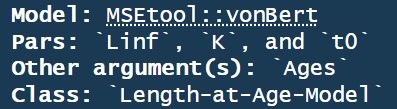
In general, a list of built-in models for a specific object class can be printed to the console with [CLASS]Models(). For example LengthModels() prints the built-in models corresponding to Length objects (Figure 17.2).
LengthModels()
If the names in Pars corresponds with a built-in model, Model will be set automatically and does not need to be defined.
Alternatively, Model can be a R function that takes an Ages object as the first argument followed by the additional parameters that describe the mean length-at-age relationship.
The output from LengthModels() shows that the vonBert function has three parameters: Linf, K, t0 (Figure 17.2). Values for these parameters must be entered in Pars in order to use this growth function.
The structure for the values contained in Pars is similar to that described for CVatLength above, where the values can be constant over all simulations and years, or vary by simulation and/or year.
17.2.2.1.1 Constant Values over Simulations and Years
17.2.2.1.2 Linf varies over Simulations, all Pars Constant over Years
17.2.2.1.3 Time-Varying Parameters
Specifying time-varying parameters is a little more involved.
17.2.2.2 Populating MeanAtAge Directly
Here the process to create and populate a Length object is broken into several steps. In practice this can be done in one or two lines of code.
Create a new Length object:
The mean length-at-age schedule is stored in a slot named MeanAtAge, which can be specified in two ways:
- A growth model and a list of the respective parameter values
- Directly as an array specifying the mean length-at-age for each simulation and year.
17.2.2.3 Model and Parameters
The Model and Pars slots are used to generate the mean length-at-age.
Model specifies the growth function, and Pars is a named list with the parameter values.
Model can either be a character string specifying the name of the growth model corresponding with the named parameters in Pars, or
17.3 Create Length Object to SimpleStock
The above sections described various ways to populate a Length object.
Here a Length object is created with stochastic values for the growth parameters (Pars) and CVatLength that vary over simulations, and the object is added to the SimpleStock object: